For K-12 school districts
Every device on your campuses, known and accounted for.
Registration, configurable safety training, certification, campus attestation, device legality, and stolen bike recovery. One record per device, one view across every school, and reporting you can put in front of a board.
What the district gets
Six jobs. One record per device.
Districts currently spread these across a form, a video link, a spreadsheet, a sticker drawer, and a phone call to the front office.
Registration
Parents check the e-bike's legality and register online. Permits issue digitally and as a physical decal. Every e-bike, scooter, one-wheel, and bike in one record.
Configurable training
Four modules, each teaching then testing. Use our curriculum, add your own, or point families at another provider. Different requirements per device type.
Certification
Uploaded certificates are checked for a passing grade in the right student's name, whoever issued them. Completion is tied to the permit.
Campus attestation
Parent and student both sign your campus conduct rules. Your wording, dated, retained, attached to the permit record.
State law and district rules
State law enforced as the floor, your policy on top. A permit issues only when both pass, checked at issuance on the server.
Recovery and identity
A scannable decal on every permitted device. A stolen bike is identifiable, and after an accident or incident a parent is reachable with one tap. The system connects the call, with consent the parent gave at registration, and the caller never sees their number.
A sticker proves a bike was registered. It does not prove a student was trained, that the device is legal, or that anyone agreed to anything.
RidePermit ties all of it to one permit, so the record still answers questions six months later.
Policy
State law is the floor. Your policy sits on top.
Districts are not free to permit whatever they like, and they should not have to research the vehicle code to find out. RidePermit holds both layers and applies them at the moment a permit is issued.
State law
Class definitions, minimum ages, helmet requirements, and where each class may be ridden. Every state defines these differently and several change them each session. We track all fifty and cite the statute behind each rule.
District policy
Stricter than state law wherever you choose. Permitted classes, minimum age, grade restrictions, top speed limits, helmet requirements, banned models, and whether a physical decal is required on campus.
A permit issues only if both pass
Not a warning a staff member might miss. The check runs on the server at issuance, so a Class 3 bike cannot be permitted for a fourteen year old whatever anyone clicks.
- You can be stricter, never looser. A district cannot accidentally permit something state law prohibits.
- Changes take effect immediately. Update policy in the portal and the next permit reflects it, dated and attributed.
- The law is public, not buried. Families read the same state law summary on our site before they register, which cuts the questions arriving at your front office.
- Every rule cites its source. When a parent asks why, the answer is a statute number, not a district opinion.
Training
Training you configure, not training you accept.
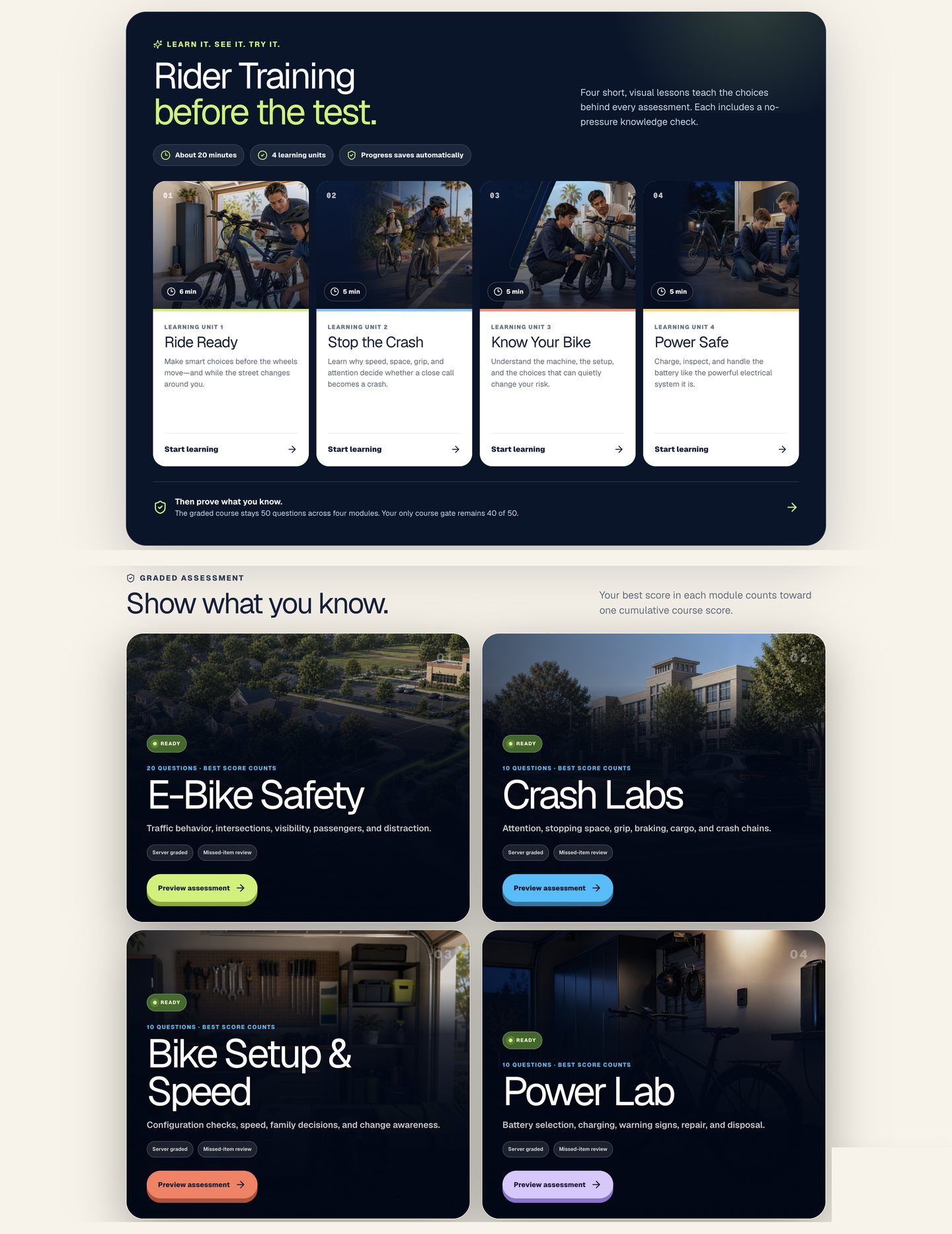
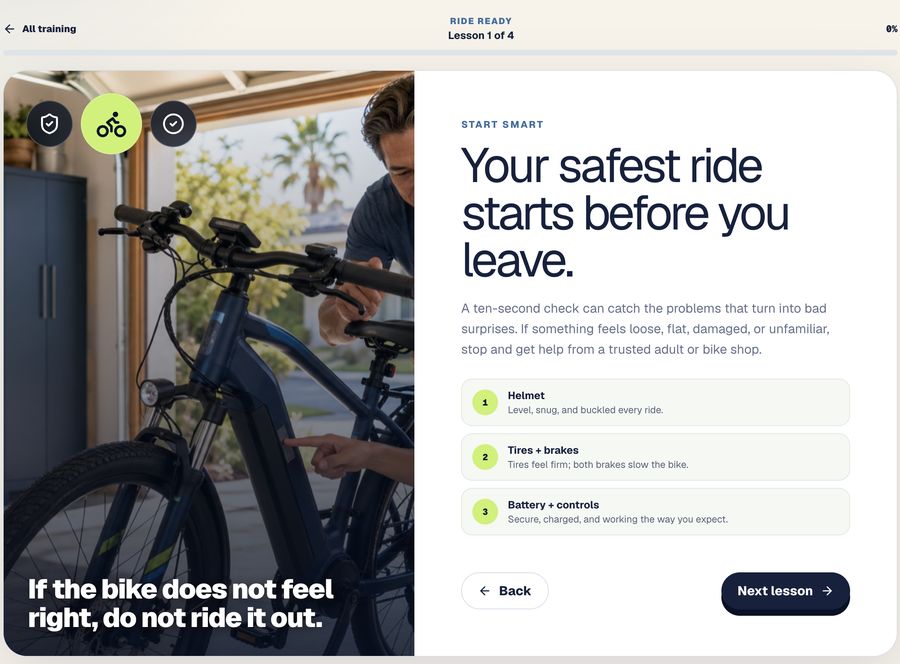
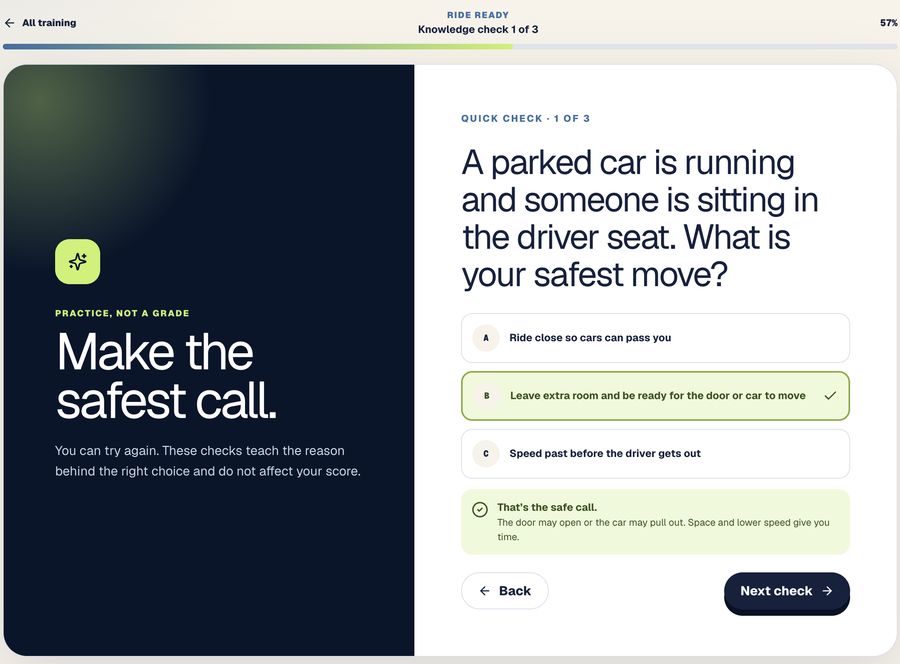
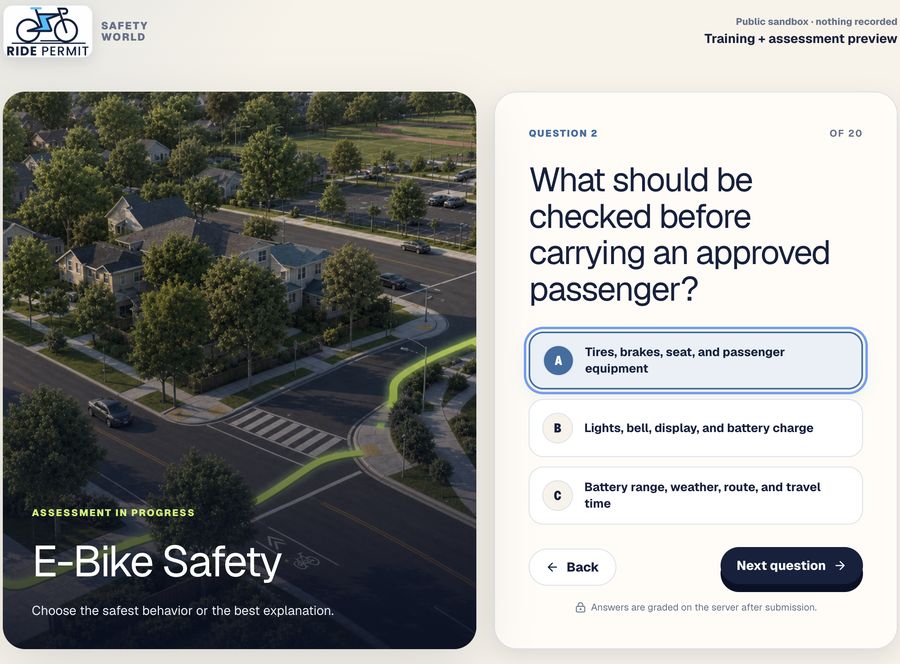
Four modules, each one teaching before it tests. Students learn from short visual lessons, practice with ungraded checks, then take a graded assessment on the situations they just studied. Complete all four in any order, score 40 of 50 overall, and the certificate is recorded on the permit.
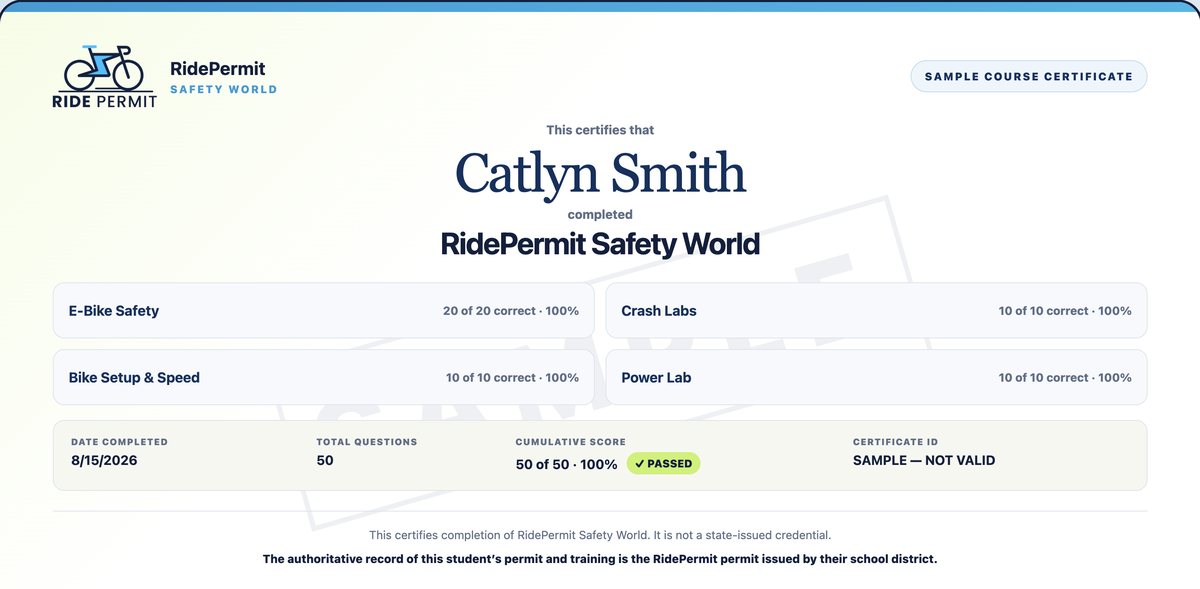
What completion produces
A certificate with a name on it.
Student name, date, per-module scores, cumulative score, and a certificate ID. Everything a free public course certificate leaves off, and everything a school needs to know it belongs to the student holding it.
- Recorded on the student's permit automatically
- Score by module, so staff can see where a rider was strong or weak
- Verifiable by certificate ID, not by trusting a PDF
Download the training curriculum and assessment guide (PDF)
Assessment sits inside each module rather than in one exam at the end, so a student is tested on what they just learned while it is fresh. The pass mark is cumulative across the course, and you can see exactly which module a rider has finished and how they scored on each.
Use our curriculum
Ride Ready, Stop the Crash, Know Your Bike, and Power Safe. Fifty graded questions across the four modules, built from League of American Bicyclists, NHTSA, and PeopleForBikes material. Included.
Add your own
Upload district videos, write local questions, and put your campus rules into the attestation. Your content sits alongside ours in the same flow.
Use another provider
Point families at any external course you already trust. We verify the certificate that comes back and record the completion against the permit.
| Device type | Modules | Graded questions | Attestation | Extra check |
|---|---|---|---|---|
| Class 1 and 2 e-bikes | 4 | 50 questions, 40 to pass | Helmet and conduct | Class verified |
| Class 3 e-bikes | 4 | 50 questions, 40 to pass | Helmet and conduct | Age 16 verified |
| Scooters | 2 | Tested after each | Conduct and parking | None |
| Bikes and boards | 1 | Tested after each | Helmet | None |
Defaults shown. Every row is editable per district.
The permit
One permit, two forms.
The digital permit is the record. The decal makes it visible on the bike rack. Districts get both, and neither is an add-on purchase.
The digital permit
Issued the moment requirements are met. This is the authoritative record, valid on its own whether or not a decal has arrived in the mail.
- On the parent's phone, immediately
- Carries training, class, and attestation
- Status updates live if suspended or expired
- Renews without reissuing anything physical
The physical decal
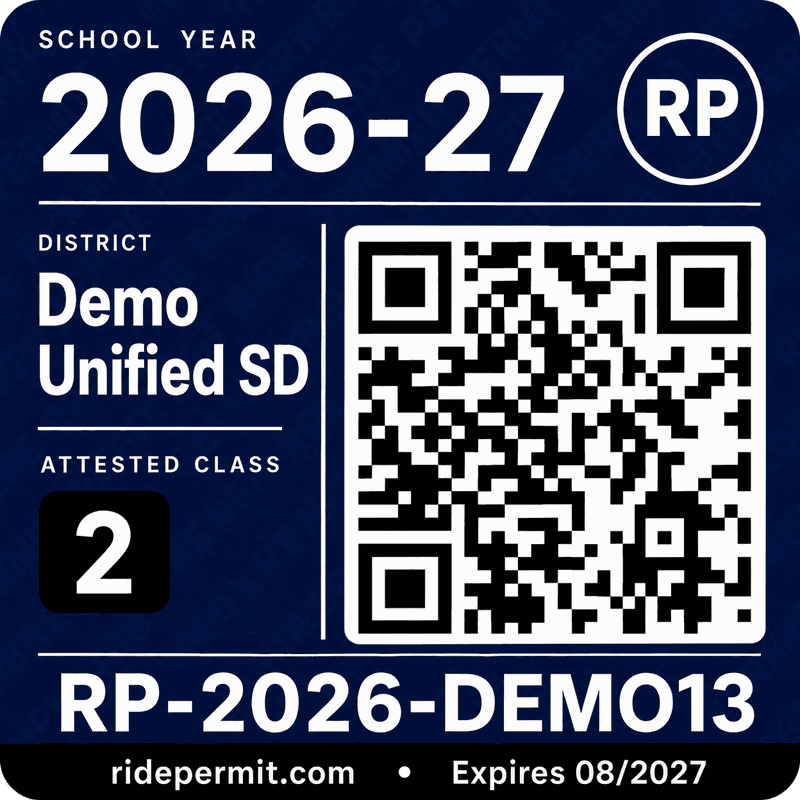
A scannable tag on the frame. Weatherproof, tamper-evident, mailed to the home and included for every permit.
- Visible identity at the bike rack
- Scan resolves to permit validity, no student name
- Makes a stolen bike identifiable
- Print queue and fulfilment handled by us
Verification
Scan. Know instantly.
Point any phone camera at the decal. Status appears in under a second. No app, no login, no training for staff, and no personal details on screen.
- Any smartphone camera. Works on every iPhone and Android with nothing to install and no account.
- Status only. The result shows whether the permit is valid. No name, no address, no parent information.
- Live from the record. If a permit is suspended after the decal is printed, the next scan shows it. The sticker never goes stale.
- Public verification page. Campus staff, a parent, or a bike shop can all confirm a permit the same way.
- Request parent contact. After an accident or incident, anyone who scans the decal can tap one button. Where the family opted in, the system connects the call to the parent. The caller never sees the number, and every request is rate-limited and logged.
Administration
Frictionless for families, and for your front office.
Most district programs fail on administration rather than intent. Every step that needs a staff member is a step that does not get done before school starts.
A typical district program
Seven steps, four systems, one weekend of staff time
- Parent finds a QR code and a form
- Student takes a state course on a separate site
- Prints a certificate with no name on it
- Watches a hospital safety video somewhere else
- Signs a paper attestation and returns it to the office
- Brings the bike to a weekend inspection event
- Collects a numbered sticker that links to nothing
With RidePermit
One flow, on a phone, about an hour
- Parent registers the device and it is class-checked as they type
- Training and assessment completed in the same place
- Parent and student sign the attestation together
- Permit issues digitally, decal mailed to the home
Scale
One standard, across every district you operate.
A family with children at two schools can face two different processes, and a student who moves districts starts from nothing. That is not a policy choice anyone made. It is what happens when every district builds its own program alone.
Same process, every district
Families register the same way in every district, in every state, while each district keeps its own rules and its own state law underneath.
Records that travel
A student who transfers keeps their training and device history. The new district sees it immediately rather than starting over.
A shared reference point
When state guidance changes, it updates once for everyone. No district is left rewriting policy from a legislative summary.
Inside the district portal
What your administrators see every day.
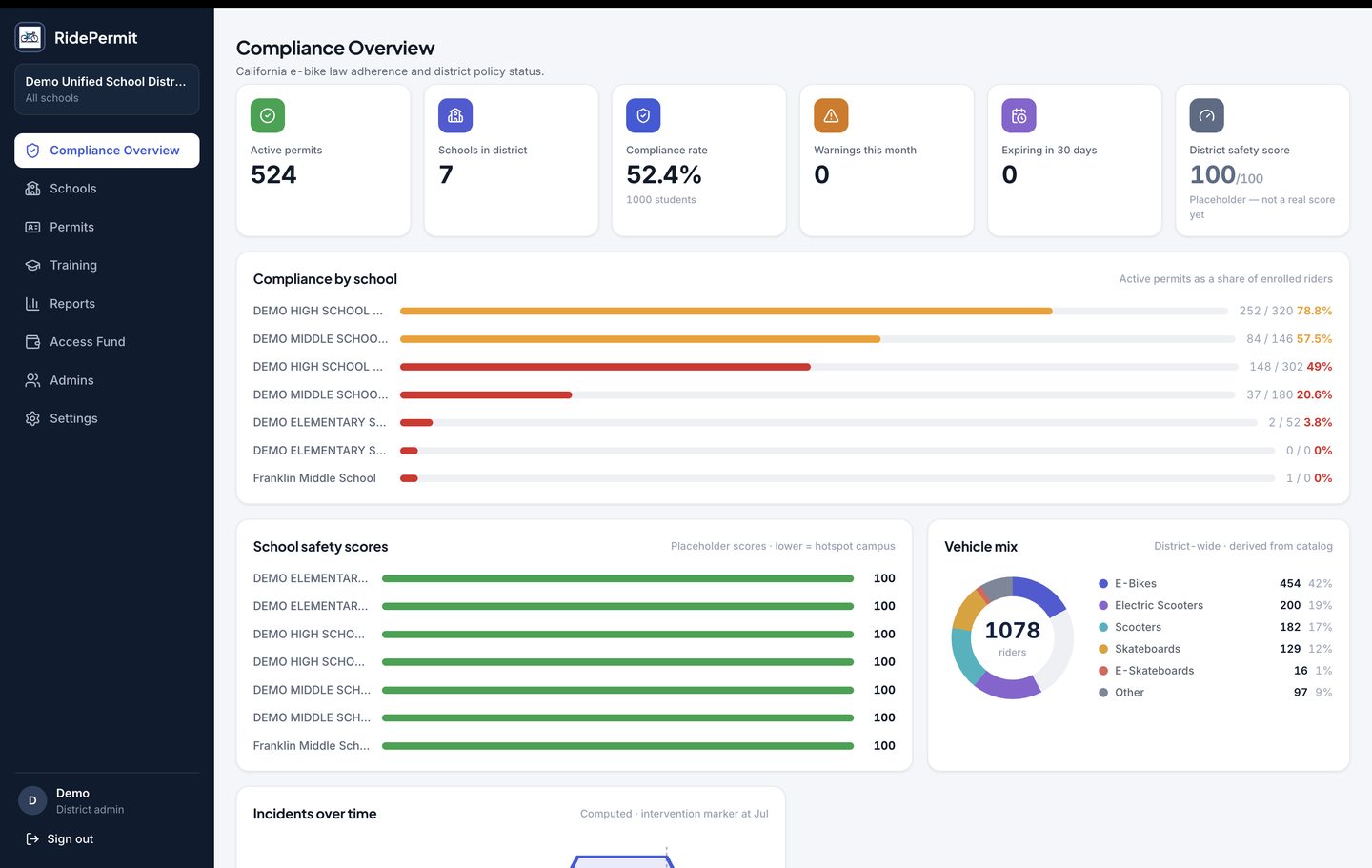
Real screens from the district portal, with demo data. Compliance, reporting, and policy, one login, scoped to your district.
Compliance overview
Active permits, compliance rate, expirations, and a school-by-school breakdown the moment you log in. The schools that need attention are the ones at the top.
- Compliance by school
- Vehicle mix across the district
- Permits expiring in 30 days
- Incidents over time
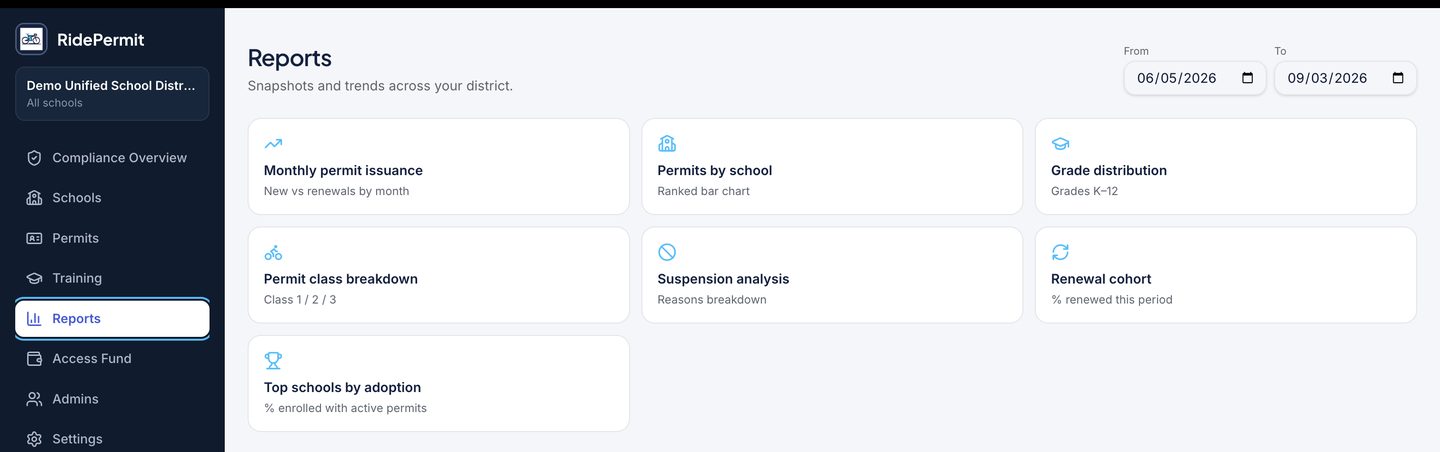
Reports
Seven reports, any date range, exportable for a board packet or an insurance conversation. The renewal cohort and adoption rankings are the ones districts come back to.
- Monthly permit issuance
- Permits by school
- Grade distribution
- Permit class breakdown
- Suspension analysis
- Renewal cohort
- Top schools by adoption
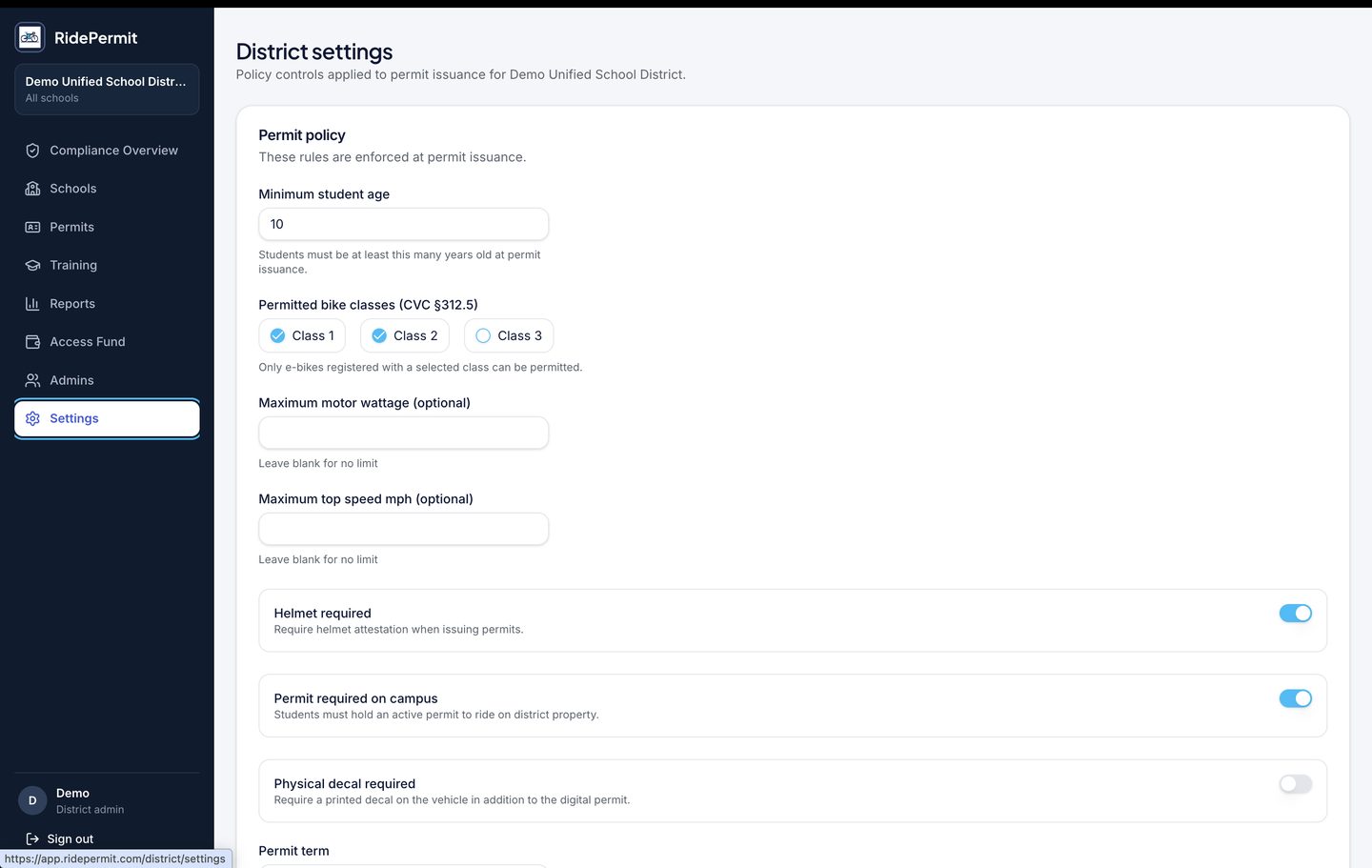
District policy
Your rules, set once and enforced at every permit issuance. Change a setting and the next permit reflects it, with the change dated and attributed.
- Minimum student age
- Permitted e-bike classes
- Motor wattage and top speed limits
- Helmet attestation
- Permit required on campus
- Physical decal requirement
- Permit term and school year
- Safety coordinator contact
What changes
What a district can do that it could not do before.
Walk into a board meeting with data
Live compliance rates, per-school breakdowns, and permit history. Ready to present, ready to export, ready to defend.
Know before the incident, not after
Risk alerts show which school needs attention while there is still time to do something about it.
Never be caught without documentation
Every permit, attestation, training completion, and status change is timestamped and permanently on record. The audit trail builds itself.
Say yes and be live the same day
No IT implementation and no procurement project. Set up takes minutes, and your dashboard is live the day you enroll.
Pricing
One district subscription. No cost to families.
Bands are set by the number of permitted devices, not by enrollment. A district with forty thousand students and three hundred riders should not pay like a district with three thousand riders.
| Permitted devices | Annual fee | Effective cost per rider | Typical district |
|---|---|---|---|
| Up to 250 | $4,500 / year | $18 or less | Single middle or high school |
| 251 to 750 | $9,500 / year | $13 to $38 | Small district, few campuses |
| 751 to 1,500 Most common | $16,500 / year | $11 to $22 | Mid-size district |
| 1,501 to 3,000 | $27,500 / year | $9 to $18 | Large unified district |
| 3,001 and above | $42,000 / year | Under $14 | County office or very large unified |
Included in every band
- Unlimited schools
- Unlimited staff accounts
- Physical decals for every permit
- Safety training and certification
- Parent and student attestations
- District policy engine
- Compliance dashboard and reporting
- Device legality checking
- Stolen device registry
- Data export at any time
- No setup or implementation fee
- No per-student or renewal fee
Your band is fixed at signing
No mid-year true-up. Your invoice never grows because more families registered in October.
Year one bills at the lowest band
No district knows its rider count before it starts counting. We carry that risk, not you.
Re-tiering at renewal only
With a full year of real data in hand, as part of a normal renewal conversation.
Four percent annual uplift, stated up front
Written into the agreement at signing so you can budget years ahead.
Purchase order, not a board item
Every band sits below typical state competitive bid thresholds for district purchases.
An exit instead of a discount
Cancel any time in year one for a prorated refund, with a full export of your records at no cost.
A parent-funded deployment is available for districts with no software budget line. Families pay a small per-permit fee instead of the district paying a subscription, and every platform feature stays the same. Most districts choose the subscription, because in many states a district cannot require a family to pay for something the district mandates.
Procurement
Ready for your technology and risk teams.
The questions a district asks before signing, answered before the meeting.
Student data privacy
Signed data privacy agreement available for any district to adopt. Minimum necessary data, role-scoped access, append-only audit log.
Independent security review
Third-party penetration test summary a technology director can read, available on request.
Insurance
Certificate of insurance naming the district as additionally insured, available on request.
Nothing to deploy
No servers, no installs, no IT project. Districts typically go live within weeks, most of it spent setting policy rather than configuring software.
Your data is yours
Full export of permits, training, and audit records at any time, at no cost, written into the agreement rather than offered as a courtesy.
Parent consent, in plain language
Families choose at registration whether contact can be requested through a scan. Nothing about a student leaves the district, and no student photo is ever collected.
Download the Student Data Privacy Agreement (PDF)·Download the Procurement Packet (PDF)
District FAQ
The questions your business office, counsel, and IT will ask.
Answered before the meeting. If yours is not here, ask us and we will add it.
Cost and business model
What does RidePermit cost the district?
An annual subscription banded by the number of permitted devices, from $4,500 to $42,000. That is the whole cost. No license fee, no per-student fee, no implementation charge, no renewal fee, and no charge to add schools.
Do families pay anything?
Not under a district subscription. Registration, the safety course, the digital permit, and the physical decal are all included.
Can families pay instead of the district?
Yes. A parent-funded deployment is available for districts with no software budget line. Families pay a small per-permit fee and every platform feature stays the same. Most districts choose the subscription, because in many states a district cannot require a family to pay for something the district mandates.
Will the price change during the year?
No. Your band is fixed at signing, with no mid-year true-up. Year one bills at the lowest band. Re-tiering happens only at renewal, with a full year of real data, and the annual uplift of four percent is written into the agreement up front.
Does this need a board vote?
Every band sits below typical state competitive bid thresholds for district purchases, so it is normally a purchase order rather than a board agenda item. Your business office can confirm for your state.
What data is collected
Do we have to send you student data?
No. RidePermit receives no data from the district, no SIS integration, and no roster upload. All information is entered by a parent or legal guardian.
What exactly is collected?
Student first and last name, date of birth, school, and grade. Bike make, model, class, and serial number, with a photo of the bike. Parent or guardian name, email, and phone. The uploaded training certificate, if an outside provider was used. No photo of the student is collected.
What is deliberately not collected?
No student photo, no Social Security number, no home address, no GPS or location history, no academic, attendance, discipline, or health records. No payment card data is stored by RidePermit.
Do students have accounts?
No. Accounts are created and held by a parent or legal guardian. The student does not log in.
Is student data sold or used for advertising?
Never. Student data is not sold, not used for advertising, and not shared with anyone other than the enrolled district and its schools.
Who sees what
What does someone see if they scan a decal?
That the permit is valid, the school, the district, the bike class, and the expiration date. No student name, address, phone number, or photo.
What do school staff see?
Permits issued at their own school: the student, the bike, permit status, training status, and permit history.
What does a district administrator see?
All permits across the district, plus the compliance dashboard and reports.
Can anyone outside the district look up a student?
No. Access is scoped to the district and its schools, and every access to a permit record is permanently logged with who, what, and when. Districts may request that log at any time.
How are parents reached after an incident?
Only where the family opted in at registration. The public scan page shows a Request parent contact button for opted-in permits. Tapping it has the system connect the call to the parent. The caller never sees the parent's number, and it never leaves the system. Requests are rate-limited and logged, and a parent can switch it off at any time.
Privacy, security, and compliance
Which privacy laws apply?
The privacy policy addresses COPPA, FERPA where applicable, and state student privacy laws. Because data is provided directly by a parent rather than by the district, most records are not district education records, but RidePermit operates as though they are.
Will you sign our student data privacy agreement?
Yes. We would rather sign the agreement your district already uses than ask your counsel to review a vendor's form.
How long is data kept?
For the life of the permit plus seven years, to support district audits, then deleted or de-identified. A parent may request deletion at any time and we respond within thirty days.
Has the platform been independently security tested?
An independent penetration test is scheduled ahead of our first district deployment, and the summary is shared with every district under evaluation. Today the platform enforces deny-by-default database access, role-scoped permissions across five distinct roles, server-side authorization on every privileged action, and a separate append-only audit log.
Where is data hosted?
In the United States, on a managed cloud database platform.
Training and verification
Which safety course is required?
Whichever you choose. RidePermit includes a four-module course, Ride Ready, Stop the Crash, Know Your Bike, and Power Safe, with fifty graded questions. Districts can use it as is, add their own videos and local rules, or accept certificates from outside providers they already trust.
Why is certificate verification the hard part?
Many free public safety certificates carry no student name, no date, no score, and no identifier. There is no practical way for a school to confirm the certificate in front of it belongs to the student who handed it over.
How is an outside certificate verified?
Uploaded certificates are read automatically and checked against your approved provider list, the student's name, and the school year. Anything uncertain is routed to a person for review rather than approved or rejected automatically.
Who is responsible for the accuracy of a permit?
The parent or legal guardian, who affirms at registration that everything submitted is true. That affirmation is recorded with a timestamp. RidePermit does not inspect the bike or measure its motor. The bike's class is declared by the parent, and the permit says so on its face.
Does a permit claim the training is genuine?
No, and this is deliberate. Every permit shows the strength of the evidence behind it. Provider verified means the provider confirmed completion directly. Staff reviewed means a person at the district looked at the certificate. Parent attested means the parent affirmed completion with no certificate on file, which is disabled by default and never labeled Verified. The district decides which tiers it accepts.
Implementation and control
What does the district configure?
Approved training providers, permitted bike classes, minimum ages including the Class 3 rule, permit term and school-year dates, helmet and decal requirements, the campus conduct attestation wording, and whether parent attestation is permitted at all.
How long does implementation take?
Hours, not weeks. There is no software to install and nothing for IT to deploy. Setup is configuration: schools, settings, and staff accounts.
What do we have to do operationally?
Communicate the program to families, and look at the small number of registrations the system flags for a person. There is no data entry.
We already have a permit program. Can it carry over?
Yes. Existing programs, policies, and approved providers carry over. An existing policy is an advantage, not an obstacle.
Legal and exit
Does a permit mean a student is legally allowed to ride?
No. A permit reflects that the district's own requirements were met on the information provided. It is a compliance record, not a legal determination, and RidePermit does not certify roadworthiness, rider competence, or compliance with state law.
Does adopting RidePermit create liability for the district?
That is a question for district counsel. What the platform provides is a record: who was permitted, on what basis, verified by whom, and what was checked. Districts running paper programs generally cannot produce that record.
What happens if we leave?
You export permit and audit records at any time, in a standard format, at no cost. There is no exit fee. Families keep their records, marked as no longer district-administered.
Who is behind RidePermit?
RidePermit, Inc., based in Orange County, California. The founder, Tony Bright, is a Capistrano Unified parent whose two children went through the district from kindergarten through twelfth grade, and a career enterprise technologist.
Request a district demo
See your district's dashboard, with your district's name on it.
We will build a live demo with your schools and your current permit rules, and walk your team through it in about thirty minutes.
- Your district on the dashboard, not a generic demo
- Scheduled within one business day
- No commitment, no sales pressure